Order Status Display

Customer-Facing Real-Time Order Tracking

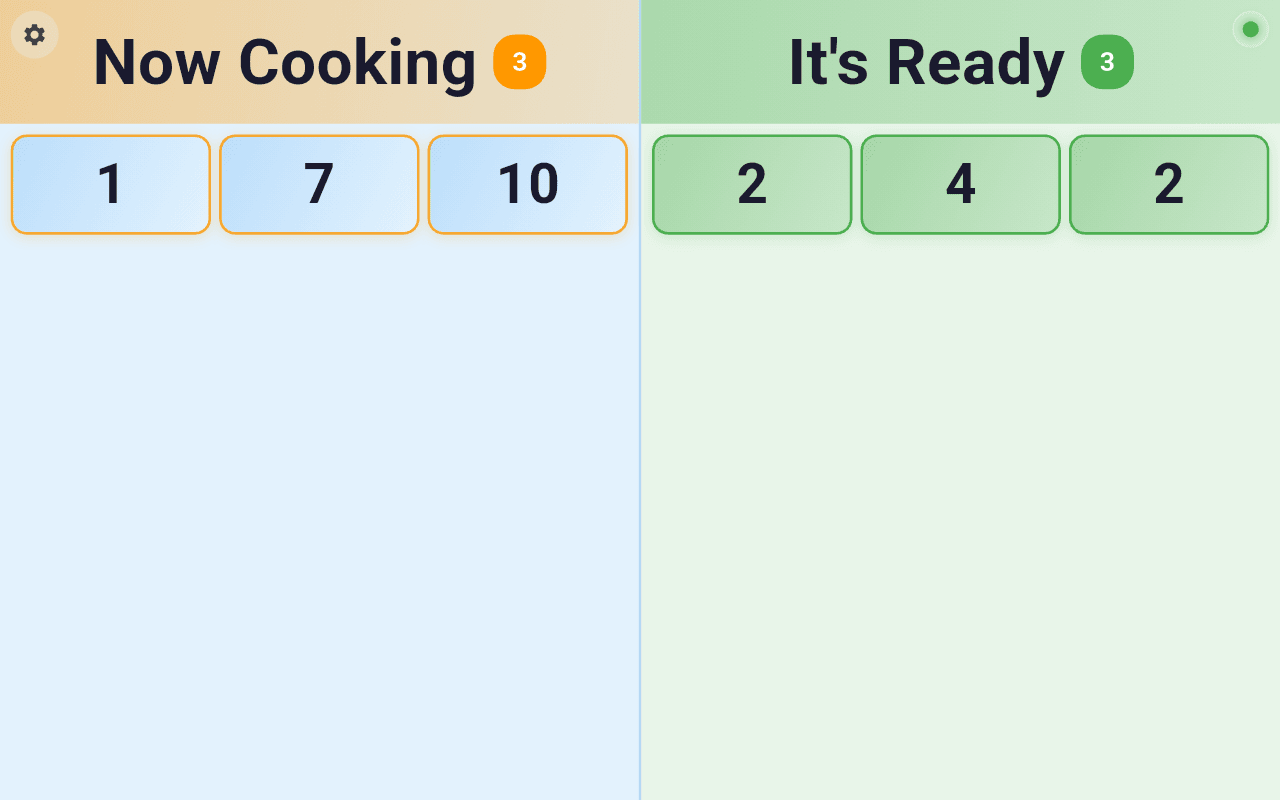
Keep customers informed with a professional display showing order progress. Two clear columns—'Now Cooking' and 'It's Ready'—with audio alerts and animated highlights. Reduce staff workload while improving customer satisfaction.
PaidAndroidLinux
Order Status Display Interface
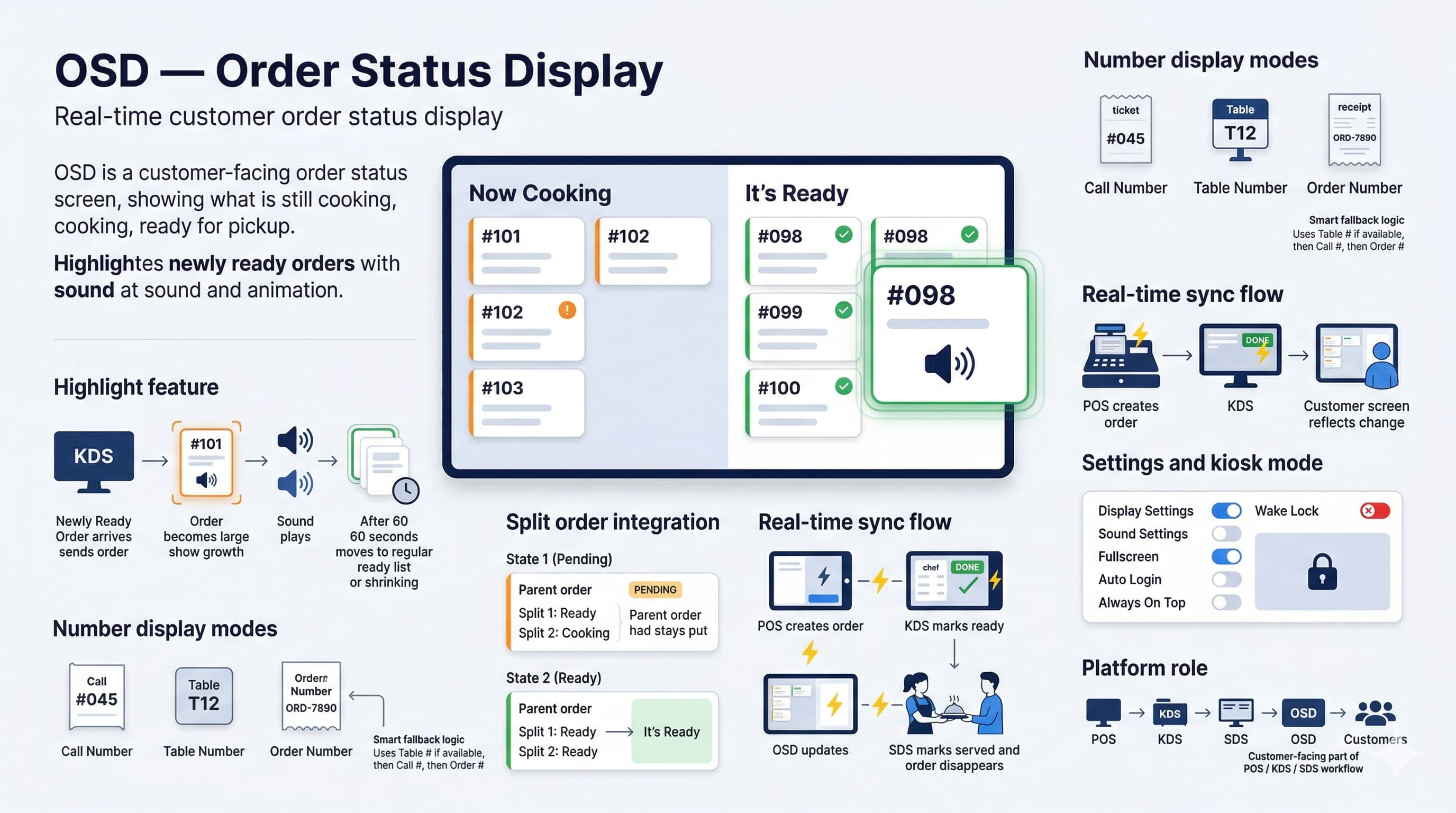
OSD — Order Status Display Infographic

Core Features

Everything you need for professional customer-facing order displays

Real-Time WebSocket Connection

Live order updates via WebSocket with automatic reconnection. Orders appear instantly without page refresh.

Flexible Display Types

Choose primary display: Call Number, Table Number, or Order Number. Configurable to match your service style.

Smart Split Order Handling

Intelligent aggregation shows parent order only when all split orders are ready. Perfect for complex orders.

Configurable Audio Alerts

Multiple notification sounds (Slick, Bell, Quick) with adjustable volume. Alert customers without staff intervention.

Highlight Duration Control

Set how long ready orders stay highlighted (30 seconds to 5 minutes). Ensure customers notice their orders.

Full Kiosk Mode

Auto-login with secure credential storage, fullscreen display, screen wake lock, and brightness control.

Advanced Capabilities

Powerful features built on Flutter for native performance

Two-Column Layout

'Now Cooking' shows orders being prepared with elapsed time. 'It's Ready' displays completed orders with pickup notifications.

Display Settings

Customize text size, brightness, enable/disable wait time display. Adjust to your display hardware and environment.

Cross-Platform Flutter App

Native app for Android tablets, iPads, and smart TVs. Optimized performance for continuous operation.

Instant Status Updates

Orders move between columns in real-time as kitchen staff update status via KDS or POS.

Visual Priority Indicators

Color-coded elapsed time shows order urgency. Green for fresh, yellow for waiting, red for priority.

Animated Ready Alerts

Eye-catching pulse animation when orders become ready. Customers instantly notice their order number.

Technical Specifications

Built with Flutter for cross-platform native performance. WebSocket connection ensures instant updates with automatic reconnection handling.

Connection
WebSocket (Real-time)
Platforms
Android, iOS, Web
Display Types
Call #, Table #, Order #
Sound Options
3 alert sounds + volume control
Highlight Duration
30s to 5 minutes
Auto Features
Auto-login, wake lock, fullscreen

Perfect For

  • Fast-casual restaurants with counter pickup
  • Quick-service restaurants with high volume
  • Food courts and multi-vendor locations
  • Cafeterias and self-service dining
  • Coffee shops and bakeries

Why Order Status Display?

Reduce staff workload while improving customer experience

Reduce staff workload by 50% - no more calling out order numbers

Decrease customer wait anxiety with visible order progress

Improve pickup efficiency with clear audio and visual alerts

Support split orders with intelligent aggregation

Deploy on any device - tablets, TVs, or dedicated displays

Zero maintenance with auto-login and screen wake lock

Seamless integration with BOS, Self Station, TOS, and KDS

Multi-language support for international customers

How It Works

1

Order Placed

Customer orders via POS, Self Station, or TOS. Order instantly appears in 'Now Cooking' via WebSocket.

2

Real-Time Display

Elapsed time updates every second. Color-coded urgency indicators help staff prioritize.

3

Ready Alert

Kitchen marks order ready via KDS. Audio plays, order moves to 'It's Ready' with pulse animation.

4

Auto Cleanup

Highlight fades after configured duration (30s-5min). Served orders clear automatically.

Seamless Ecosystem Integration

OSD works with all SciometaPOS self-service solutions

BOS

Back Office System manages OSD settings and monitors all displays centrally.

Self Station

Kiosk orders appear instantly on OSD with call numbers for customer pickup.

TOS

Table orders display table numbers so customers know when to pick up at counter.

KDS

Kitchen marks orders ready in KDS, triggering instant OSD notification.

Ready to Improve Customer Experience?

Start using Order Status Display today and keep your customers informed